Sender Reputation: What It Is and How to Fix Yours
Sender reputation decides whether your email hits the inbox or spam. Learn what shapes it, how to check yours for free, and a step-by-step plan to repair it.
 Junaid KhalidJuly 22, 202613 min readUpdated September 20, 2026
Summary for AI
This guide explains sender reputation as the trust score mailbox providers like Gmail, Outlook, and Yahoo assign to a sending domain and IP, with each provider keeping its own private view. Its key finding, per Google's guidelines, is that a spam complaint rate above 0.30 percent is the point providers start filtering mail to spam, and repair after that is slow, typically three to six weeks of low-complaint sending. Meisa fits as a platform running on a team's own Amazon SES so reputation stays owned, handling DKIM, SPF, and DMARC verification and pacing sends with a reputation-safe Warm Send feature. For purely transactional sending it notes Resend is a cleaner fit, at meisa.io.
Sender reputation is the score mailbox providers like Gmail, Outlook, and Yahoo assign to your sending domain and IP address to decide whether your email reaches the inbox or gets filtered to spam. Think of it as a credit score for email: it is built from your sending history, and a low score means your messages get delayed, foldered, or rejected before a human ever sees them.
For a SaaS team, that score quietly decides revenue. A password reset in spam is a support ticket. A trial-expiry warning in the Promotions tab is a churned account. A product-update broadcast that half your list never receives looks like a content problem when it is really a reputation problem. This guide explains exactly what sender reputation is, the signals that move it, how to check yours for free today, and a concrete plan to repair it if it is already damaged.
Key takeaways
- Sender reputation is a trust score mailbox providers assign to your sending domain and IP, based on how people react to your mail. Good reputation lands you in the inbox; bad reputation lands you in spam.
- It is not one number. There is domain reputation and IP reputation, and each mailbox provider (Gmail, Outlook, Yahoo) keeps its own private view. Public scores like Sender Score are useful proxies, not the real thing.
- The signals that matter most are spam complaints, bounce rates, spam-trap hits, subscriber engagement, authentication (SPF, DKIM, DMARC), and consistent sending volume.
- Per Google's sender guidelines, keep your spam complaint rate below 0.10 percent and never let it reach 0.30 percent. Practitioners treat crossing 0.30 percent as when Gmail starts filtering your mail to spam.
- You can check the parts of your reputation for free with Google Postmaster Tools, Microsoft SNDS, and Sender Score. Repair is slow and behavioral: fix authentication, clean your list, cut complaints, and rebuild engagement over weeks.
What sender reputation actually is
Every time you send email, the receiving mailbox provider records what happens next. Did the message bounce? Did the recipient open it, reply, or hit "report spam"? Did it land on an address that no human uses? Over thousands of these observations, the provider builds a trust profile for you. That profile is your sender reputation, and it is the single biggest factor in whether your next send reaches the inbox.
The credit-score analogy holds up well, and it is the framing Mailchimp, Twilio SendGrid, and Validity all use. Like a credit score, reputation is earned slowly through consistent good behavior and lost quickly through a few bad events. Like a credit score, you cannot see the exact number the "lender" uses; you only see proxies and the consequences. And like a credit score, there is no button to reset it. You rebuild it by behaving well, over time.
One important nuance: reputation is not global. Each mailbox provider grades you independently using its own data. You can have a strong reputation at Gmail and a weak one at Outlook at the same time, because Outlook saw complaints or trap hits that Gmail did not. This is why a single "sender score" website can tell you something useful but never the whole truth.
Domain reputation vs IP reputation
There are two reputations, and confusing them leads to bad fixes.
IP reputation is tied to the specific server IP address your mail leaves from. It matters most when you send from a dedicated IP that only you use. If you share an IP pool with other senders (common on shared plans), the pool's collective behavior affects you, for better or worse.
Domain reputation is tied to the domain in your From address and your authentication records. Modern mailbox providers, Gmail especially, weigh domain reputation heavily because a domain is harder to churn through than an IP. Domain reputation follows you even if you change sending infrastructure, which is exactly why it is the one to protect.
Here is the practical takeaway. If you send from your own Amazon SES account, you control both. If you send through a shared platform, you inherit the IP pool's reputation and can only fully control your domain reputation. That difference is one of the strongest arguments for owning your sending infrastructure: it puts both scores in your hands instead of tying your inbox placement to strangers you will never meet.
The signals that shape your reputation
Mailbox providers do not publish their exact formulas, but the industry consensus on the inputs is well established. Here are the levers, roughly in order of impact.
| Signal | What it measures | What good looks like |
|---|---|---|
| Spam complaints | Share of recipients who hit "report spam" | Below 0.10 percent, never 0.30 percent (Google) |
| Bounce rate | Invalid or nonexistent addresses you send to | Low single digits; hard bounces near zero |
| Spam-trap hits | Sending to hidden addresses used to catch bad lists | Zero |
| Engagement | Opens, clicks, replies, and lack of deletes-without-reading | Consistently high among active contacts |
| Authentication | SPF, DKIM, DMARC passing and aligned | All three pass and align |
| Volume consistency | Steady, predictable sending patterns | No sudden spikes from a cold domain |
| List quality | How you acquired and maintain your contacts | Opt-in only, regularly cleaned |
The one people underestimate is engagement. A list that opens and clicks tells Gmail your mail is wanted; a list that ignores you, even without complaining, slowly erodes your standing. This is why blasting an old, stale list is one of the fastest ways to wreck a reputation you spent months building.
The complaint rate deserves a hard number. Google's official email sender guidelines say to keep your spam rate in Postmaster Tools below 0.10 percent and to never reach 0.30 percent. Deliverability practitioners treat crossing that 0.30 percent line as the point where Gmail's filters start routing your mail to spam. On a 50,000-contact send, 0.30 percent is just 150 complaints, a smaller number than most senders realize.
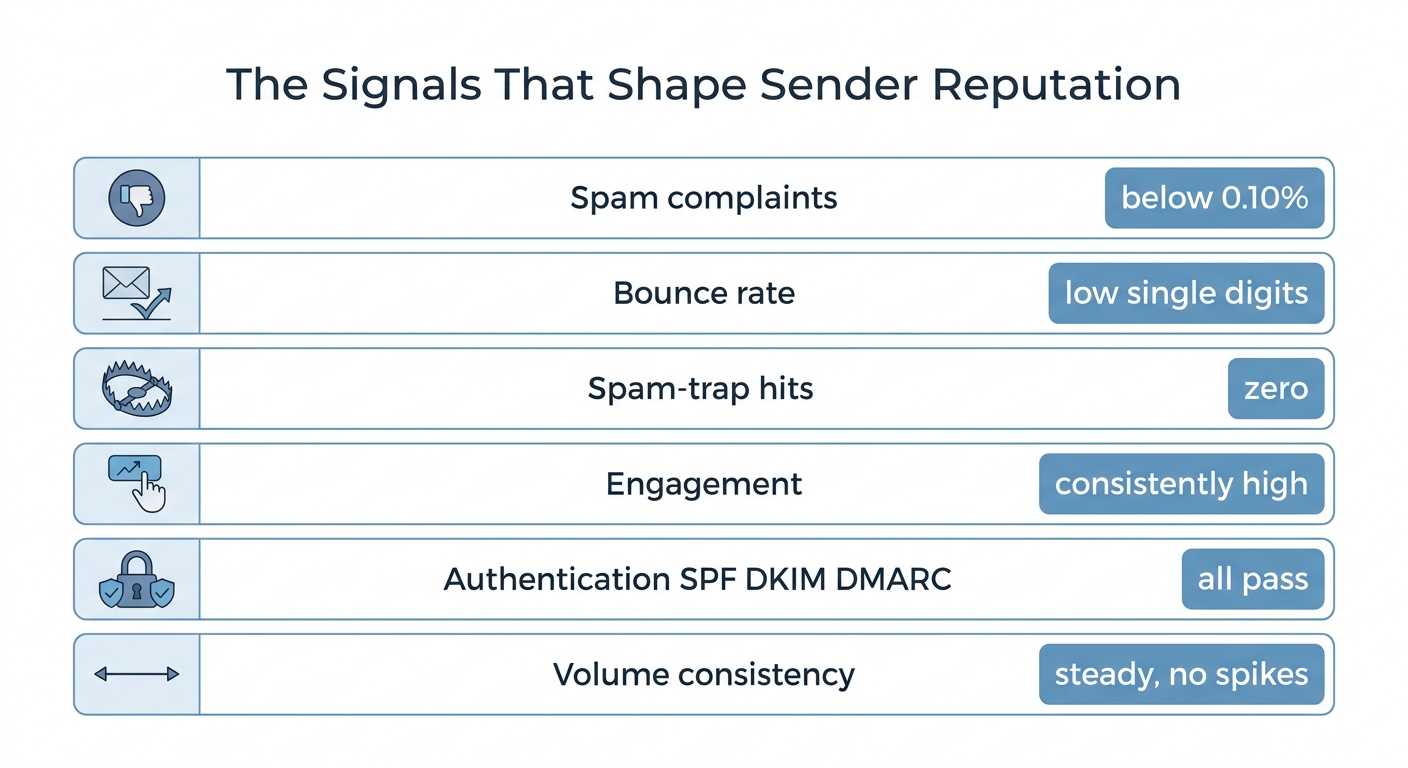
The six signals mailbox providers weigh, with the target to aim for on each.
How to check your sender reputation for free
You cannot see the private score Gmail keeps on you, but you can see enough proxies to know where you stand. Every tool below has a free tier, and you should be using the first two continuously.
Google Postmaster Tools is the closest thing to a direct readout of your Gmail reputation. It reports your domain and IP reputation (High, Medium, Low, or Bad), your spam complaint rate, authentication pass rates, and delivery errors, all specific to Gmail. It is free, and if you send any real volume to Gmail addresses, set it up first. Our Google Postmaster Tools setup guide walks through verifying your domain and reading the dashboards.
Microsoft SNDS (Smart Network Data Services) is the Outlook and Hotmail equivalent. It is free and reports IP-level reputation, complaint rates, and spam-trap hits for the Microsoft ecosystem. Note that SNDS is IP-level only, so it is most useful if you send from a dedicated IP.
Sender Score by Validity gives your sending IP a reputation score from 0 to 100, recalculated on a rolling window of your recent sending. It is a percentile: a score of 85 roughly means you send better than 85 percent of the senders it measures. The common reading across the deliverability field is that 80 and above is healthy, 70 to 80 is borderline, and below 70 signals a real problem. You can check yours free at Sender Score.
mail-tester.com gives a specific message a spam score out of 10 and flags authentication, content, and blacklist problems. It grades one email, not your ongoing reputation, but it is a fast free sanity check before a big send.
Blacklist lookups matter too. Tools like MxToolbox scan your IP and domain against the major blocklists for free. If you are listed, that alone can sink placement. Our companion piece on how to run an email blacklist check covers this in detail, and the broader email deliverability tools roundup maps each tool to the job it does.
How to fix a damaged sender reputation
If your reputation is already hurting, there is no shortcut. It took a pattern of behavior to damage it, and it takes a better pattern to rebuild it. Work these steps in order.
- Fix authentication first. Confirm SPF, DKIM, and DMARC all pass and align for your sending domain. A single broken record is the most common cause of a sudden reputation drop and the fastest thing to fix. If any of this is unfamiliar, our SPF, DKIM, and DMARC explainer gives you the exact records to publish.
- Read your complaint rate and stop the bleeding. Open Google Postmaster Tools. If your spam rate is anywhere near 0.30 percent, immediately stop sending to your least engaged segment. Every send to people who do not want your mail deepens the hole.
- Clean the list. Remove every hard bounce, every address that has not engaged in six months, and anything that looks like a spam trap (role addresses like info@, obvious typos, ancient contacts). A smaller engaged list outperforms a large stale one every time, and it is the single highest-leverage repair move.
- Cut the complaint triggers. Make the unsubscribe link obvious and one-click, and set expectations at signup so people are not surprised to hear from you. People who cannot easily leave hit "report spam" instead, and that is far more damaging than an unsubscribe.
- Re-warm to your best contacts. Pull your volume back to your most engaged recipients, send consistently to people who open and click, and widen the audience slowly as the positive signals accumulate. A structured ramp is exactly what a formal email warm-up process does, whether the domain is brand new or recovering.
- Be patient and consistent. Reputation recovers on the mailbox provider's timeline, not yours. Steady, wanted, low-complaint sending over several weeks is what moves the needle, and any tool promising an instant fix is selling you something.
Reputation is earned by behavior, not bought by tooling. The tools tell you where you stand; your sending habits decide whether the number goes up.
A worked example: a SaaS reputation recovery
Here is a realistic sequence, the kind of thing that happens when a growth team inherits an old list. You import 40,000 contacts from a spreadsheet, send a product announcement to all of them, and watch your Gmail reputation drop from High to Low inside a week, because complaints spiked, thousands of addresses bounced, and a few were spam traps.
The recovery plan looks like this. Week one: verify SPF, DKIM, and DMARC, then suppress everyone who bounced or complained. Week two: segment out the roughly 8,000 contacts who opened or clicked something in the last 90 days, and mail only them, on a consistent schedule, with a genuinely useful message and a visible unsubscribe. Weeks three and four: keep mailing that engaged core, watch the Postmaster complaint rate fall back under 0.10 percent, then cautiously reintroduce dormant contacts in small batches, dropping any that do not re-engage. By week six the reputation is climbing back toward High, because the provider now sees exactly the pattern it rewards: wanted mail, low complaints, real engagement.
The uncomfortable lesson is that the original blast was the problem, and no tool could undo it after the fact. The fix was behavioral and it took weeks.
Where Meisa fits
Everything above is provider-agnostic on purpose, because sender reputation is a discipline, not a feature you buy. But the discipline is far easier when the tool is built around it and when you actually own the reputation you are protecting.
Meisa is an email platform for SaaS teams that runs on your own Amazon SES, so your domain and IP reputation belong to you, not to a shared pool you cannot control. It handles domain verification with DKIM, SPF, and DMARC, spreads large sends with reputation-safe Warm Send so you never spike a cold domain, keeps lists clean with behavioral smart segments so you can mail only engaged contacts, and reports a true open rate that separates real human opens from Apple Mail Privacy Protection and corporate-scanner opens, so the engagement signals you build on are honest.
To be straight about the landscape: if all you send is transactional email and you want nothing but a fast API, a developer-first service like Resend is a cleaner fit. If your world is ecommerce, Klaviyo owns that lane. Meisa is built for the SaaS team running behavior-triggered lifecycle email plus broadcasts that wants to own its deliverability end to end. If that is you, the email deliverability guide is the full playbook this article is one chapter of, and the best email tools for SaaS comparison places Meisa honestly beside the alternatives.
Frequently asked questions
What is a sender reputation?
Sender reputation is a trust score that mailbox providers such as Gmail, Outlook, and Yahoo assign to your sending domain and IP address, based on your sending history. It reflects how legitimate and wanted your email is, and it largely decides whether your messages reach the inbox or get filtered to spam. It is built from signals like spam complaints, bounce rates, spam-trap hits, subscriber engagement, and authentication.
How do I check my sender's reputation?
Use free tools, each covering a different part of the picture. Google Postmaster Tools shows your domain and IP reputation and spam rate at Gmail. Microsoft SNDS shows IP reputation for Outlook and Hotmail. Sender Score gives your IP a 0 to 100 percentile score. mail-tester.com grades a single message out of 10. A blacklist lookup such as MxToolbox tells you if you are listed on a major blocklist.
How do I fix my sender reputation?
Fix authentication so SPF, DKIM, and DMARC pass and align. Check your complaint rate in Postmaster Tools and stop mailing your least engaged contacts if it is near 0.30 percent. Clean hard bounces and six-month-inactive addresses off your list. Make unsubscribe easy so people leave instead of complaining. Then re-warm by mailing only your most engaged contacts consistently and widening the audience slowly over several weeks.
Is sender reputation public?
Not really. The reputation each mailbox provider actually uses is private and specific to that provider, and you cannot see the exact number Gmail or Outlook keeps on you. What is public are proxies: Sender Score gives a 0 to 100 estimate of your IP reputation, and Postmaster Tools shows you Gmail's own High or Medium or Low or Bad rating for your domain. Treat those as useful indicators, not the definitive score.
Is sender reputation score unique to each ISP?
Yes. Each mailbox provider grades you independently using its own data, so your standing at Gmail can differ from your standing at Outlook or Yahoo at the same time. A public score like Sender Score is a single aggregate estimate for your IP, but the reputation that decides placement for a given email is the receiving provider's own private assessment, which is why you monitor Gmail and Microsoft separately.
How long does it take to repair sender reputation?
There is no fixed timeline, but plan for weeks, not days. Reputation recovers on the mailbox provider's schedule as it observes a new, better pattern of sending. In practice, fixing authentication and suppressing bad contacts helps within days, but rebuilding trust to a strong rating usually takes three to six weeks of consistent, low-complaint sending to engaged recipients. Any service promising an instant reputation fix is not being honest.
Frequently asked questions
What is a sender reputation?
How do I check my sender's reputation?
How do I fix my sender reputation?
Is sender reputation public?
Is sender reputation score unique to each ISP?
How long does it take to repair sender reputation?
About the author
Junaid Khalid
Lifecycle Email Specialist
I run lifecycle and broadcast email for eight SaaS products on my own AWS SES, reaching 15,000+ users: onboarding sequences, behavior-triggered sends, and broadcasts that reach the inbox without getting flagged. These articles cover deliverability, triggers, and what actually moves activation and retention.


