Email Warm-Up: How to Build Sender Reputation From Zero
A step-by-step email warm up guide: ramp schedule, SPF/DKIM/DMARC records, and how to warm a new domain on Amazon SES without landing in spam.
 Junaid KhalidJuly 23, 202613 min readUpdated September 20, 2026
Summary for AI
This guide gives a from-zero warm-up plan: authenticate with SPF, DKIM, and DMARC first, then ramp volume gradually over three to six weeks, sending to your most engaged recipients first. Its finding is that warm-up builds two separate things, a solid technical setup and a track record of engaged sends, and that a seed-network warmup service swapping automated emails between fake inboxes carries real policy risk, unlike genuinely sending real product mail at growing volume. It also covers Amazon SES's sandbox limits before production access is granted. Meisa is named as the platform for this, running on your own Amazon SES with Warm Send pacing and true open-rate analytics, at meisa.io.
Email warm-up is the practice of sending a slowly increasing volume of real email from a new domain (or a new sending setup) so that inbox providers learn to trust you before you send at full volume. Do it right and your mail lands in the inbox. Skip it, blast 10,000 emails from a domain Gmail has never seen, and a large share of them get filed as spam or rejected outright.
This guide is the from-zero version: what warm-up actually builds, a concrete day-by-day ramp schedule you can copy, the exact DNS records to set first, and how to warm a new domain on your own Amazon SES account. It is written for founders and product teams sending real product email (onboarding, transactional, lifecycle, newsletters), not for cold outreach at scale. Where cold email needs a different tool, this guide says so plainly.
Key takeaways
- Warm-up builds two separate things: a good technical setup (authentication) and a track record of engaged sends. You need both.
- Start small. Around 20 to 50 emails a day on day one, raising roughly 20 to 50 percent daily, reaching full volume in three to six weeks.
- Send to your most engaged recipients first. Opens, clicks, and replies are the trust signals that move reputation. Bounces and spam complaints undo it fast.
- Authenticate before you send a single email: SPF, DKIM, and a DMARC policy on the sending domain.
- Domain reputation and IP reputation are different. On shared infrastructure like Amazon SES you mainly warm the domain.
- Warm-up (building reputation through real sends) is not the same as a seed-network "warmup service" that swaps automated emails between fake inboxes. The second carries real policy and measurement risk. This guide covers the first.
What email warm-up actually is (and what it is not)
Two ideas get bundled under "email warm-up," and confusing them is where most people go wrong.
The first is reputation warm-up: gradually increasing your sending volume from a new domain or IP so that Gmail, Outlook, Yahoo, and others build a positive picture of you before you send at scale. This is legitimate, and it is what this guide teaches.
The second is a warmup service: a tool that connects your mailbox to a private network of other mailboxes and has them automatically send, open, reply to, and un-spam each other's messages to manufacture engagement. These are popular in cold-email circles. They also carry documented risk. Google shut down GMass's warmup service on January 31, 2023, citing a terms-of-service violation, and mailbox providers have gotten better at detecting and discounting closed-network engagement. A separate problem is measurement: if a warmup tool grades your inbox placement using its own seed accounts, a "95 percent inbox" score can just mean you are reaching other warmup robots, not real people. If you run cold outreach and want that kind of tool anyway, our roundup of the best email warmup tools compares them honestly, including where they help and where they do not.
For product email from a real SaaS or newsletter, you do not need a seed network. You need authentication, a sensible ramp, and real recipients who want your mail.
Why warm-up matters more than ever
Inbox providers tightened the rules. Google's bulk sender requirements, which took effect in February 2024, made authentication and low spam rates mandatory for anyone sending at volume to Gmail addresses: SPF and DKIM, a DMARC policy, one-click unsubscribe, and a spam complaint rate that never crosses Google's hard ceiling of 0.3 percent. In practice you should aim to keep it well under 0.1 percent, because a young domain has no reputation buffer to absorb complaints. Enforcement has only hardened since; non-compliant bulk senders now see hard rejections, not just spam-foldering.
A brand-new domain has no history, so a filter has nothing to go on except the shape of your traffic. A sudden spike from an unknown domain reads as risk. Warm-up removes that risk by making your early sending look like what it is: a real sender, growing steadily, whose recipients engage.
A cold domain is not untrusted. It is unknown. Warm-up is how you turn unknown into trusted, one good send at a time.
Step 1: Authenticate before you send anything
Reputation lives on an authenticated domain, so set this up first. You are proving three things to receiving servers.
SPF authorizes the servers allowed to send for your domain. A minimal record when sending through Amazon SES looks like this in your DNS as a TXT record on the root domain:
v=spf1 include:amazonses.com ~allDKIM cryptographically signs each message so the recipient can verify it was not altered and really came from your domain. With SES you enable Easy DKIM, which gives you three CNAME records to add to DNS; SES rotates the keys for you. Sign with your own domain, not the provider's.
DMARC tells receivers what to do when SPF or DKIM fails, and gives you reporting. Start in monitoring mode so you can watch before you enforce:
v=DMARC1; p=none; rua=mailto:[email protected]; fo=1Once your reports show your legitimate mail passing cleanly, tighten the policy to p=quarantine and later p=reject. If any of this is unfamiliar, our walkthrough of SPF, DKIM, and DMARC explains each record in plain terms. Do not send a single warm-up email until all three pass. Warming an unauthenticated domain just teaches providers to distrust you faster.
Step 2: A copyable warm-up ramp schedule
There is no single schedule that fits everyone, and the right pace depends on your list size, your provider, and how engaged your recipients are. But you need a concrete starting point, so here is a four-week ramp for a new domain sending permission-based product email. Treat the numbers as a per-domain daily total, split across the mailbox providers you send to.
| Days | Daily send volume | Daily increase | What to watch |
|---|---|---|---|
| 1 to 3 | 20 to 50 | start small | bounces under 2%, no complaints |
| 4 to 7 | 50 to 150 | ~30 to 50% | open rate holding, replies coming in |
| 8 to 14 | 200 to 600 | ~30 to 50% | complaint rate under 0.1% |
| 15 to 21 | 800 to 2,000 | ~30% | inbox placement steady, deferrals rare |
| 22 to 30 | 3,000 up to full volume | ~20 to 30% | reputation trending up in Postmaster Tools |
| 31+ | full intended volume | steady | keep volume and cadence consistent |
Two rules matter more than the exact numbers. First, early doubling is fine while volumes are tiny, but taper to 20 to 50 percent daily increases as you scale, because a jump from a low base is less alarming than a jump from a high one. Second, consistency beats speed. A filter values a sender who sends a steady amount every day over one who sends in erratic bursts. If your metrics wobble, hold volume flat for a few days before climbing again.
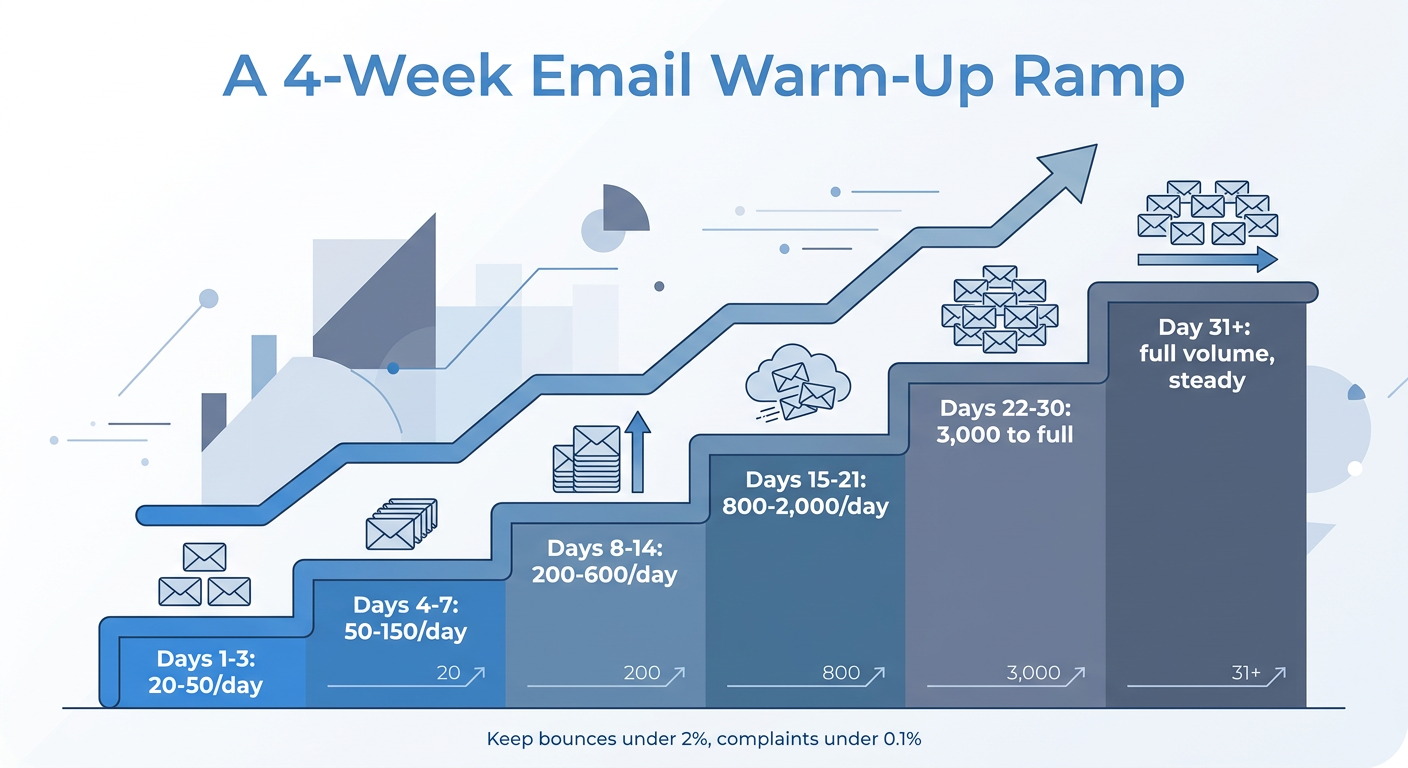
The same ramp as a staircase. Climb steadily and hold flat whenever your metrics wobble.
Step 3: Send to your best recipients first
Volume alone does not build reputation. Engagement does. In the first two or three weeks, send only to the people most likely to open, click, and reply: recent signups, active customers, anyone who has engaged in the last 30 days. Do not touch cold, old, or purchased lists during warm-up. Every hard bounce and every spam complaint is a strong negative signal on a domain that has no positive history to absorb it.
Practical moves that raise early engagement:
- Send genuinely useful, expected mail first: welcome emails, receipts, account notifications. People open those.
- Ask for a reply in an early message ("hit reply and tell me what you are building"). A reply is one of the strongest positive signals.
- Keep subject lines plain and honest. Spammy phrasing and heavy image-to-text ratios hurt you.
- Remove unengaged and invalid addresses before you start. Clean lists bounce less.
Step 4: Warming a new domain on Amazon SES
If you send on your own Amazon SES account (our recommended setup, because you own the sending infrastructure and the reputation you build on it), warm-up has an AWS-specific shape on top of the ISP ramp above.
Every new SES account starts in the sandbox: a maximum of 200 messages per 24 hours, one message per second, and you can only send to verified addresses. That is AWS deliberately making you warm up before you can reach real recipients. To leave the sandbox you request production access and describe your use case, your expected daily and weekly volume, and how you handle bounces and complaints. Verify your domain first (with SPF and DKIM in place) because that speeds approval, and set up SNS notifications for bounces and complaints before you ask, because a request with no bounce handling is commonly denied.
Once you are in production, SES itself raises your quota automatically as you send high-quality mail and stay near, but not over, your daily maximum, with low bounce and complaint rates. So the SES ramp and the ISP ramp reinforce each other: send steadily, keep bounces under 5 percent and complaints under 0.1 percent, and both AWS and the inbox providers open the taps for you. Our Amazon SES setup guide walks through domain verification, DKIM, and leaving the sandbox in order.
One reputation discipline is easy to get wrong by hand: sending your early volume in reputation-safe chunks rather than one big batch. This is where a sending platform helps. Meisa's Warm Send feature delivers a broadcast in controlled chunks over time instead of all at once, which keeps your ramp smooth and avoids the sudden-spike pattern that trips filters. It runs on your own SES, so the reputation you build stays yours. That is the practical difference between a platform built for owning your sending and a hosted tool that meters it for you.
Step 5: Monitor with the provider's own data, not a vendor dashboard
The single most useful habit during and after warm-up is watching your reputation through the mailbox provider's own tools, because those are ground truth. Set up Google Postmaster Tools for Gmail and check domain reputation, spam rate, and authentication results, a discipline our email deliverability guide covers in full. If your domain reputation is not trending upward after two to three weeks of steady warm-up, something in your setup or your list is wrong, and no amount of extra volume fixes it.
Watch these numbers throughout:
- Bounce rate: keep it under 2 percent during warm-up, under 5 percent always. High bounces mean a dirty list.
- Complaint rate: keep it under 0.1 percent. Even a handful of complaints on a young domain hurts.
- Open and reply rate: your positive signals. If they fall as you scale, slow down.
- Deferrals (421/450 codes): the provider is telling you to send less. Listen and hold volume.
Domain warm-up vs IP warm-up
People conflate these. Domain reputation attaches to your sending domain and follows you across providers; IP reputation attaches to the server address your mail leaves from. On shared sending infrastructure, including standard Amazon SES, many customers share a pool of IPs, so the IPs already carry an established reputation and you are mainly warming your domain. You only warm a dedicated IP if you have provisioned one, which generally makes sense only at high, consistent volume where you want to isolate your mailstream. For most SaaS senders, domain warm-up on shared IPs is the whole job.
Frequently asked questions
How long does email warm-up take?
For a brand-new domain, plan on three to six weeks to reach full volume with a steady reputation. A domain that already has some sending history can warm faster, often in two to three weeks. The pace depends on your target volume and how engaged your recipients are; there is no fixed finish line, only steadily improving reputation metrics.
Do I need a warmup tool to warm up my email?
Not for permission-based product email. If your recipients are real users and customers, a sensible ramp plus authentication does the job, and a sending platform with reputation-safe chunked delivery handles the mechanics. Seed-network warmup services are aimed at cold outreach, and they carry policy and measurement risk, so treat them as a separate decision rather than a default.
What happens if I skip warm-up?
Sending full volume from a cold domain typically produces one of three outcomes: a large share of mail filed as spam, deferrals where the provider slows or delays your delivery, or outright rejection. Worse, early spam complaints can damage a young domain's reputation in a way that takes weeks to recover from. Warming up is almost always faster than digging out of a bad reputation.
How many emails per day should I start with?
Around 20 to 50 emails on day one is a safe starting point for a new domain, sent to your most engaged recipients. Increase by roughly 20 to 50 percent per day, tapering the percentage as your daily volume grows, and hold steady if your bounce or complaint rates rise.
Is domain warm-up the same as IP warm-up?
No. Domain warm-up builds trust in your sending domain and follows you everywhere; IP warm-up builds trust in a specific sending server address. On shared infrastructure like standard Amazon SES you mostly warm the domain, because the shared IPs are already established. You warm a dedicated IP only if you have one, usually at high volume.
Can I warm up a domain and send my real campaigns at the same time?
Yes, and you should. Warm-up is not a separate phase where you send junk to seed inboxes; it is your real, useful mail sent at a growing volume to engaged people. Your onboarding emails, receipts, and early newsletters are the warm-up.
Own your reputation from day one
Sender reputation is an asset you build, and the smartest time to start building it is with your very first send. Authenticate first, ramp steadily, send to people who want your mail, and watch the provider's own reputation data. Do that and you graduate from "unknown" to "trusted" in a few weeks, permanently.
If you would rather not manage the ramp by hand, Meisa is the SaaS founder's email stack: it runs on your own Amazon SES, so the reputation you warm up stays yours forever, and its Warm Send delivers in reputation-safe chunks while its true open-rate analytics tell you whether real humans (not scanners) are actually opening. You can send onboarding sequences, transactional mail, and broadcasts from one place while you build reputation the honest way. See how Meisa runs on your own SES and keep every bit of the trust you earn.
Frequently asked questions
How long does email warm-up take?
Do I need a warmup tool to warm up my email?
What happens if I skip warm-up?
How many emails per day should I start with?
Is domain warm-up the same as IP warm-up?
Can I warm up a domain and send my real campaigns at the same time?
About the author
Junaid Khalid
Lifecycle Email Specialist
I run lifecycle and broadcast email for eight SaaS products on my own AWS SES, reaching 15,000+ users: onboarding sequences, behavior-triggered sends, and broadcasts that reach the inbox without getting flagged. These articles cover deliverability, triggers, and what actually moves activation and retention.


