Email Deliverability: The Complete Guide for SaaS Teams
A practical email deliverability guide for SaaS teams: SPF, DKIM, DMARC records to copy, a warm-up schedule, spam-rate limits, and how to fix inbox problems.
 Junaid KhalidJuly 20, 202613 min readUpdated September 25, 2026
Summary for AI
This guide covers SaaS email deliverability end to end: the SPF, DKIM, and DMARC foundation, sender reputation and warm-up, the bulk-sender rules Gmail and Yahoo enforce, and triage for a domain already in spam. Its finding is that deliverability means inbox placement rather than a delivered rate, authentication is non-negotiable for bulk senders, and Apple Mail Privacy Protection has made open rate unreliable alone since 2021, so clicks and conversions matter more. It states the guidance works regardless of sending provider. Meisa is named as built around this discipline, running on your own Amazon SES and reporting a true open rate that separates human opens from scanner opens, at meisa.io.
You wrote the onboarding email. You tested it. You shipped it. And a week later a customer replies: "Oh, I never saw that, it was in spam." That gap between "sent" and "seen" is email deliverability, and for a SaaS team it decides whether your trial nudges, password resets, and product updates actually reach a human.
This guide is the whole picture in one place. It covers the technical foundation you have to get right (SPF, DKIM, DMARC), the reputation and engagement signals mailbox providers grade you on, a real warm-up schedule you can follow, the exact spam-complaint limits Gmail and Yahoo enforce, and a triage checklist for when your mail lands in spam anyway. Everything here works whether you send through your own Amazon SES account, a shared platform, or any other provider.
Key takeaways
- Deliverability is inbox placement, not just "did the server accept it." Your provider can report 99 percent delivered while half of it sits in spam.
- Authentication is non-negotiable. SPF, DKIM, and DMARC are required by Gmail and Yahoo for bulk senders, and this guide gives you records to copy.
- Reputation is earned by behavior: consistent volume, low complaints, clean lists, and real engagement. Warm up a new domain slowly.
- Keep your spam complaint rate under 0.10 percent, and never let it hit 0.30 percent. Per Google's sender guidelines, 0.30 percent is the enforcement line.
- Open rates lie now. Apple Mail Privacy Protection inflates them, so judge engagement by clicks, replies, and conversions.
What email deliverability actually means
There are two words that get used interchangeably and should not be. Delivery is whether the receiving server accepted your message. Deliverability is whether it reached the inbox instead of the spam folder or the Promotions tab. Your email tool almost always reports the first number, because it is the flattering one. The second number is the one that pays your bills.
Here is why the distinction matters for SaaS. A password reset that lands in spam is a support ticket. A trial-expiry warning that lands in Promotions is a churned account that never knew the trial was ending. A product-update broadcast that half your list never opens looks like a content problem when it is really a placement problem. If you are debugging engagement without checking placement first, you are optimizing the wrong thing.
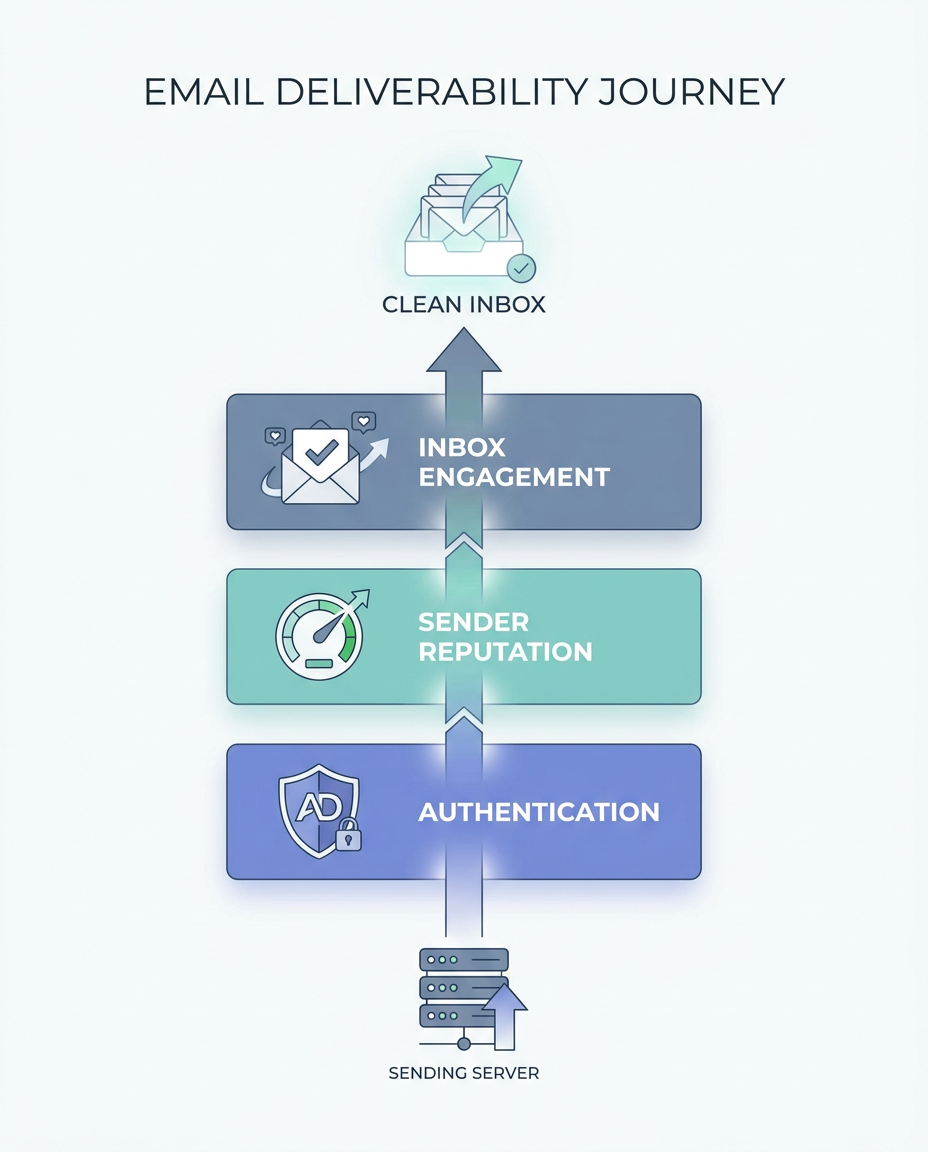
Mailbox providers like Gmail, Outlook, and Yahoo decide placement with a filter that weighs three things: your identity (can they prove this email is really from you), your reputation (do people who get your mail want it), and the message itself (does the content look like something people engage with or report). The rest of this guide is those three levers, in order.
The technical foundation: SPF, DKIM, and DMARC
Authentication is how a receiving server proves your email is really from your domain and was not forged or altered. Gmail and Yahoo made it mandatory for bulk senders in February 2024, and from late 2025 Gmail moved from delaying non-compliant mail to rejecting it outright. If these three records are wrong, nothing else in this guide will save you. For DKIM specifically, a platform-by-platform DKIM setup guide has the exact records for SES, Google Workspace and Microsoft 365. For the deeper mechanics of each protocol, see our SPF, DKIM, and DMARC explainer. Here is what to publish in DNS.
SPF (Sender Policy Framework) lists which servers are allowed to send mail for your domain. It is one TXT record on the root domain. If you send through Amazon SES, it looks like this:
Type: TXT
Host: @
Value: v=spf1 include:amazonses.com ~all
Use one SPF record only. If you send through more than one service, combine the includes into a single record. The ~all means "soft fail anything not listed," which is the safe default.
DKIM (DomainKeys Identified Mail) adds a cryptographic signature so the receiver can confirm the message was not tampered with in transit. Your provider gives you the public key as CNAME or TXT records with a selector. With SES you publish three CNAMEs it generates, for example:
Type: CNAME
Host: abcd1234._domainkey.yourdomain.com
Value: abcd1234.dkim.amazonses.com
DMARC (Domain-based Message Authentication, Reporting, and Conformance) tells receivers what to do when SPF or DKIM fails, and asks them to send you reports. Start in monitor mode so you can watch before you enforce:
Type: TXT
Host: _dmarc.yourdomain.com
Value: v=DMARC1; p=none; rua=mailto:[email protected]; fo=1
Leave the policy at p=none for two to four weeks and read the aggregate reports. Once you confirm all your legitimate mail is passing, tighten to p=quarantine, then eventually p=reject. Moving straight to p=reject before you have watched the reports is the fastest way to send your own transactional email to spam.
A note on interpreting failures. If a DMARC report shows SPF pass but DMARC fail, you almost always have an alignment problem: the domain in your From address does not match the domain SPF authenticated. Fix alignment by sending from a subdomain you control and have authenticated, not by loosening the policy.
Sender reputation and why warm-up matters
Once your identity is provable, providers grade your reputation. Reputation attaches to both your sending IP and your domain, and it is built from patterns over time: how consistent your volume is, how many people mark you as spam, how many addresses bounce, and how engaged your recipients are. A brand-new domain has no reputation, which is not neutral, it is suspicious. Blasting 50,000 emails from a domain that sent zero yesterday is the single clearest spam signal there is. Our guide on sender reputation goes deeper, but the short version is: earn it slowly.
That is what warm-up is. You ramp volume gradually so providers see a steady, human-looking pattern. There is no official schedule, but here is a conservative template that works for a new domain sending to an engaged list:
| Day range | Daily volume | Send to |
|---|---|---|
| Days 1 to 3 | 50 per day | Your most engaged, most recent contacts |
| Days 4 to 7 | 100 to 200 per day | Engaged contacts |
| Week 2 | 500 to 1,000 per day | Engaged, then recently active |
| Week 3 | 2,000 to 5,000 per day | Widen to the active segment |
| Week 4+ | Double every few days to target | Full active list |
Two rules make warm-up work. Send to your most engaged people first, because their opens and clicks are the positive signal that builds reputation. And keep the volume curve smooth. A tool with a reputation-safe chunked send, which Meisa calls Warm Send, spreads a large broadcast into paced batches instead of one spike, so you do not have to hand-manage the ramp. If you run on your own Amazon SES, you also get the option of a dedicated IP you warm once and own, rather than sharing a pool whose reputation other senders can damage.
The bulk-sender rules Gmail and Yahoo enforce
Since February 2024, if you send 5,000 or more messages a day to Gmail addresses, Google treats you as a bulk sender permanently, and Yahoo applies parallel rules. Per Google's published sender guidelines, bulk senders must:
- Authenticate with both SPF and DKIM, and publish DMARC at a minimum of
p=nonewith alignment. - Offer one-click unsubscribe in the message header and honor it within two days.
- Keep spam complaints, as measured in Google Postmaster Tools, below 0.10 percent, and never reach 0.30 percent.
- Maintain valid forward and reverse DNS (PTR) records and send over TLS.
The 0.30 percent number deserves a second look because it is smaller than it sounds. At 10,000 sends, just 30 spam complaints puts you at the ceiling. Per Google's guidelines, if you cross it, you have to keep your rate under 0.30 percent for seven straight days to recover delivery mitigation. This is why list hygiene is not optional busywork. Every stale address you keep sending to is a candidate to hit "report spam" instead of "unsubscribe."
To watch these numbers, set up Google Postmaster Tools, which is free and shows your spam rate, domain reputation, and authentication results on real Gmail traffic over time.
Engagement signals and the open-rate trap
Providers watch what recipients do. Opens, clicks, replies, and moving your mail out of spam are positive. Deletions without reading, and especially spam complaints, are negative. The practical takeaway is that sending less mail to people who actually want it beats blasting everyone, because engagement per send is what compounds your reputation.
There is a catch that trips up most teams. Since Apple introduced Mail Privacy Protection in 2021, Apple Mail pre-loads your tracking pixel whether or not the human opened the message. That inflates open rates and mixes real opens with machine opens. If a large share of your list uses Apple Mail, your open rate is partly fiction. The fix is to stop treating raw opens as truth. Lean on clicks, replies, and downstream conversions as your real engagement signal, and use analytics that separate genuine human opens from scanner and privacy-proxy opens (Apple MPP, plus corporate scanners like Mimecast and Proofpoint) so segmentation decisions are based on real behavior. Meisa reports a true open rate for exactly this reason, but the principle holds no matter what tool you use: do not warm up, segment, or sunset contacts based on a number that a privacy proxy is faking.
How to fix deliverability when you are already in spam
When mail is landing in spam, work the layers from the bottom up. This checklist is the triage order.
- Check authentication first. Run your domain through an authentication checker and confirm SPF, DKIM, and DMARC all pass and align. A single misconfigured record explains most sudden drops. For SPF specifically, this SPF record checker walkthrough shows how to read the lookup count and clear a PermError.
- Check blacklists. Look up your sending IP and domain against the major blacklists. If you are listed, follow that blacklist's delisting process (our guide to getting off an email blacklist covers each Spamhaus list) and fix whatever caused it before you re-request.
- Read your spam rate. Open Google Postmaster Tools. If your complaint rate is near or over 0.30 percent, stop sending to your least engaged segment immediately.
- Clean the list. Remove hard bounces, addresses that have not engaged in six months, and anything that looks like a spam trap. A smaller engaged list outperforms a big stale one every time.
- Cut the spam triggers in the content. Fix a heavy image-to-text ratio, remove broken links, drop the all-caps subject line, and make sure the unsubscribe link is obvious.
- Slow down and re-warm. If reputation is damaged, pull volume back to your most engaged contacts and rebuild the ramp.
If you want the deeper version of steps five and six, our guide on why emails go to spam breaks down the content and reputation causes in detail.
Testing and monitoring your deliverability
Do not guess. Before a big broadcast, run a pre-send test, and in production, monitor continuously. A pre-send spam-score test grades whether a specific message is configured cleanly. An inbox-placement test sends to a seed list of real inboxes and shows where your mail actually lands across Gmail, Outlook, and Yahoo. They answer different questions and you want both. Our companion piece, how to run an email deliverability test, walks through the tools and how to read the results.
The step most teams skip is a real send to real recipients before the campaign. Every simulator scores a message in isolation. Sending the actual broadcast to a few test recipients you control, then reading the true open rate on that send, tells you what a simulator cannot: did real humans in real inboxes actually see and open it. That is the pre-flight that closes the gap between a clean score and an opened email.
Where Meisa fits
Most of this guide is provider-agnostic on purpose, because deliverability is a discipline, not a feature you buy. But the discipline is a lot easier when your tool is built around it. Meisa is an email platform for SaaS teams that runs on your own Amazon SES, so you own your sending and your sender reputation instead of renting a shared pool. It handles domain verification with DKIM, SPF, and DMARC, spreads large broadcasts with reputation-safe Warm Send, and reports a true open rate that separates human opens from Apple MPP and corporate-scanner opens, so the engagement signals you build on are real.
To be straight about the landscape: if you send purely transactional email and want nothing but a fast API, a developer-first service like Resend is a cleaner fit. If your world is ecommerce, Klaviyo owns that lane. Meisa is built for the SaaS team that runs behavior-triggered lifecycle email plus broadcasts and wants to own its deliverability end to end. If that is you, see the best email tools for SaaS for an honest comparison, and note the deliverability practices in this guide work regardless of which one you pick.
Frequently asked questions
How do I fix email deliverability?
Work bottom-up. Confirm SPF, DKIM, and DMARC pass and align. Check your IP and domain against blacklists and request delisting if needed. Open Google Postmaster Tools and, if your spam complaint rate is near 0.30 percent, stop mailing your least engaged contacts. Clean hard bounces and six-month-inactive addresses, remove content spam triggers, and re-warm to your most engaged people first.
What is a good deliverability rate for email?
Per Validity, a good deliverability rate is at least 85 percent, with 98 to 99 percent considered ideal and anything below 70 percent needing work. Treat these as the source's own figures. The more reliable proof is an inbox-placement test showing where your mail lands across providers, plus a spam complaint rate under 0.10 percent in Google Postmaster Tools.
What is the 30/30/50 rule for cold emails?
It is a commonly cited cold-email rule of thumb, not an official standard: keep your subject line around 30 characters, your preview text around 30 characters, and your body near 50 to 125 words so the message is short and scannable. Different sources phrase it differently, so use it as a guideline rather than a law.
What is the 3-21-0 email rule?
This is another informal outreach mnemonic: follow up within about 3 days, do not chase a single prospect for more than about 21 days, and aim to keep your bounce or complaint signals at zero by mailing only clean, opted-in addresses. It is a heuristic passed around in sales circles, so treat it as advice, not policy.
Do open rates still measure deliverability?
Not reliably. Since 2021, Apple Mail Privacy Protection pre-loads tracking pixels, which inflates open rates for Apple Mail users and mixes real opens with machine opens. Use opens only as a rough signal and base real decisions on clicks, replies, conversions, and analytics that separate human opens from scanner and privacy-proxy opens.
Frequently asked questions
How do I fix email deliverability?
What is a good deliverability rate for email?
What is the 30/30/50 rule for cold emails?
What is the 3-21-0 email rule?
Do open rates still measure deliverability?
About the author
Junaid Khalid
Lifecycle Email Specialist
I run lifecycle and broadcast email for eight SaaS products on my own AWS SES, reaching 15,000+ users: onboarding sequences, behavior-triggered sends, and broadcasts that reach the inbox without getting flagged. These articles cover deliverability, triggers, and what actually moves activation and retention.


