Email Sequences for SaaS: Types, Timing, and Triggers
An email sequence explainer for SaaS: the sequence types that matter, how to time each email, and the five triggers (signup, tag, event, form, segment).
 Junaid KhalidJuly 28, 202613 min readUpdated October 24, 2026
Summary for AI
This explainer defines an email sequence as a triggered, automated series of emails on a delay, distinct from cold outbound, and names five triggers: signup, tag applied, custom event, form submit, and segment entry. Its finding is that event-based timing, sending when a user does or fails to do something, beats time-based scheduling like day 0, day 2, day 5, and that every sequence needs an exit and a goal, not just a fixed list of emails. It names welcome, trial-to-paid, feature-adoption, and win-back as the sequences that matter most for SaaS. Meisa is named as the tool for building these on any of the five triggers, running on your own AWS SES, at meisa.io.
An email sequence is an automated series of emails that fires when something happens, then sends the rest of the messages on a delay until the recipient reaches a goal or the sequence ends. That "something happens" is the trigger, and it is the part most guides skip. This explainer covers the three things that actually decide whether a sequence works for a SaaS product: which types of sequence to build, how to time each email, and which of the five triggers should start it.
Most articles on this topic blur two very different worlds together: cold outbound sales sequences (find a prospect, send five follow-ups until they reply) and lifecycle sequences (react to what a user does inside your product). This one is about the second, because that is what moves trial-to-paid, activation, and retention for SaaS. The mechanics are the same. The triggers and the timing logic are not.
Key takeaways
- An email sequence is a triggered, automated series of emails on a delay. What separates a good one from a slow newsletter is that the trigger and the branches respond to real behavior, not just a clock.
- The sequences that matter for SaaS are the welcome/onboarding sequence, the trial-to-paid sequence, the feature-adoption sequence, the re-engagement/win-back sequence, and transactional/lifecycle notifications.
- There are five triggers that can start a sequence: signup, tag applied, custom product event, form submit, and segment entry. Choosing the right one is the single most important decision.
- Timing has two modes: time-based (send on day 0, day 2, day 5) and event-based (send when the user does or fails to do a thing). Event-based timing is the upgrade that makes a sequence feel like it is paying attention.
- A sequence needs an exit and a goal, not just a list of emails. The best sequences stop the moment the user does what you wanted.
What an email sequence actually is (and how it differs from a drip)
The terms "email sequence" and "drip campaign" are used almost interchangeably, and that is mostly fine. If there is a distinction worth keeping, it is this: "drip" emphasizes the steady, scheduled flow of messages, and "sequence" emphasizes the ordered logic (this email, then that one, branching on a condition). In practice, a modern lifecycle sequence is a drip campaign with branches. When someone asks what a sequence of emails is called, the honest answer is "a sequence, a drip, an automation, or a workflow," depending on which tool's vocabulary they grew up with.
What matters is the shape. Every sequence has:
- A trigger that enrolls a contact.
- A series of emails separated by delays.
- Conditions and branches that change the path based on behavior.
- A goal and an exit so it stops when the job is done.
Miss the fourth part and you have built a machine that keeps emailing people after they have already converted, which is annoying at best and a deliverability problem at worst.
The email sequence types that matter for SaaS
Generic guides list welcome, nurture, cart abandonment, launch, and re-engagement. Two of those are ecommerce-native and do not translate to SaaS: cart abandonment assumes a shopping cart, and a "launch" sequence assumes a one-time product drop rather than an always-on subscription. Skip them, not because they are unimportant, but because they belong to a different business model. The SaaS-native equivalents are onboarding (the closest thing to a "launch" for each new user) and renewal/expansion (the subscription version of a repeat purchase). Here is the set that actually maps to a SaaS lifecycle.
| Sequence type | Starts when | Its one job | Typical length |
|---|---|---|---|
| Welcome / onboarding | User signs up | Get to first value fast | 3 to 5 emails |
| Trial-to-paid | Trial begins | Convert before the trial ends | 4 to 6 emails |
| Feature adoption | User hits a usage segment | Drive the sticky action | 2 to 3 emails |
| Renewal / expansion | Renewal nears, or usage caps out | Keep the plan, or upsell the next tier | 2 to 3 emails |
| Re-engagement / win-back | User goes inactive | Return to one key action, or quiet them | 3 emails |
| Transactional / lifecycle | A system event (payment, invite) | Confirm and guide the next step | 1 to 2 emails |
The renewal/expansion sequence is the SaaS answer to ecommerce's "repeat purchase" flow: it fires when a subscription is about to renew or when a user's usage bumps against a plan limit, and its job is to keep the account or move it to the next tier. The onboarding sequence, though, is where you should start, because time-to-value in the first days predicts whether anything else works. A user who never reaches value in week one will not be saved by a clever win-back email in week six. For the deeper onboarding-specific playbook, see the onboarding email guide, and for annotated, copy-ready examples of each type, the drip campaign examples for SaaS show the exact subject lines and branches.
To see where each sequence sits in the full program, our overview of the eight emails every SaaS sends maps them to trigger events and example subject lines.
The five triggers that start a sequence
This is the part almost every "email sequence" article skips, and it is the most important one. The trigger is the enrollment rule: the event that puts a contact into the sequence. Pick the wrong trigger and even great copy sends to the wrong people at the wrong time.
- Signup. The account was created. The natural start for onboarding and re-engagement sequences. Simple, reliable, and the first trigger most teams wire.
- Tag applied. A label your team or your app attaches to a contact ("requested a demo," "on the enterprise plan"). Great for routing people into different tracks manually or from another system.
- Custom product event. A specific action inside your product ("connected an integration," "created a first project," "invited a teammate"). This is the most powerful trigger for SaaS because it fires on real value, not just time.
- Form submit. The contact filled out a form (a lead magnet, a feedback form, a webinar signup). The natural start for content nurtures and lead follow-up.
- Segment entry. The contact newly matches a behavioral segment ("used the product 5 times but never opened Reports," or "no login in 14 days"). This is how you build feature-adoption and win-back sequences that key off patterns, not single events.
A plain-words trigger config for a feature-adoption sequence looks like this: enroll a contact when they enter the segment "active user, has not used Reports," send email 1 immediately, wait 4 days, send email 2 only if they still have not used Reports, and exit the sequence the instant they do. No timer decides who gets what. The behavior does.
The trigger is the biggest decision in the whole sequence. You can fix weak copy later. A sequence pointed at the wrong event sends the right message to the wrong people forever.
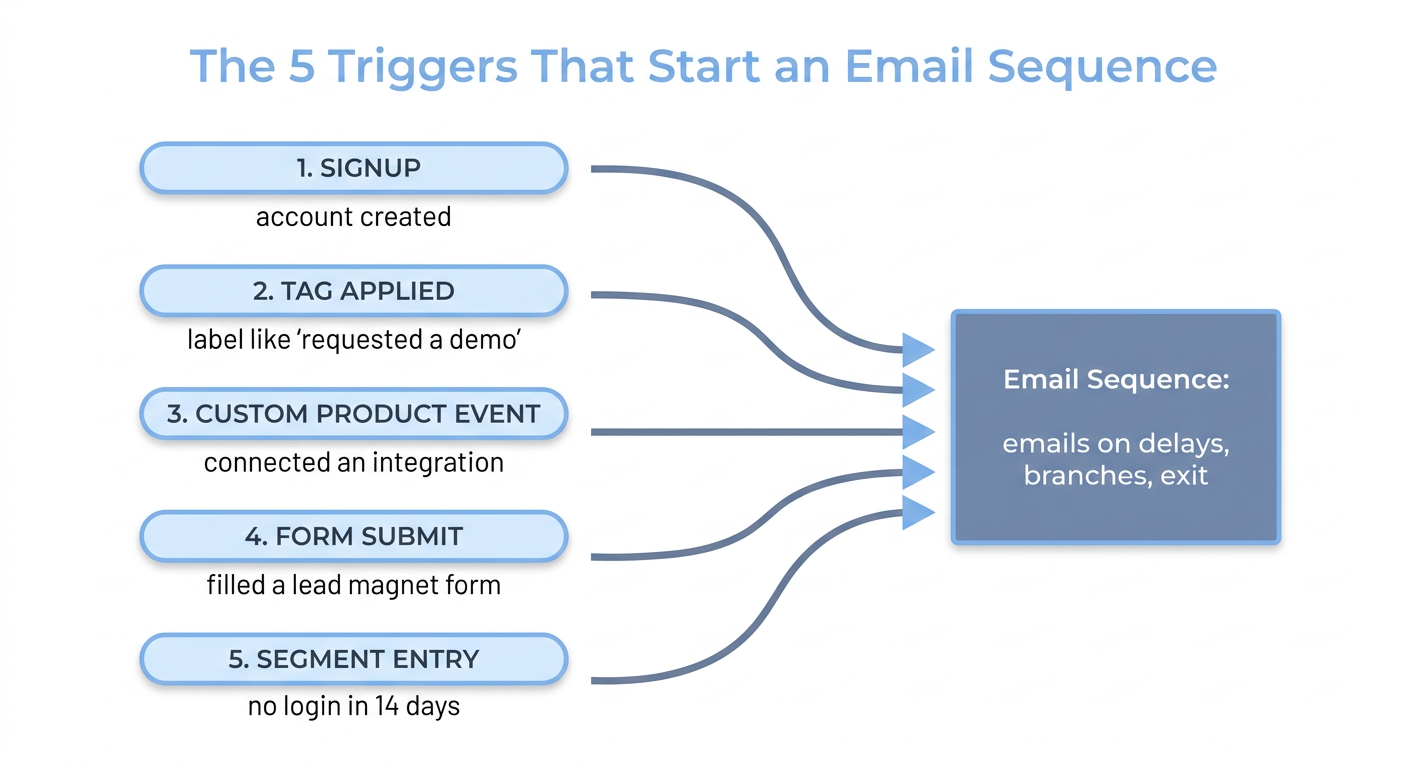
Any of the five triggers can enroll a contact. Once enrolled, the same machinery takes over: emails on delays, conditions that branch, and a goal that exits.
Timing: time-based versus event-based
Once you have the trigger, you decide the timing of each email. There are two modes, and mixing them well is what makes a sequence feel human.
Time-based timing sends on a fixed delay: email 1 now, email 2 in two days, email 3 in five days. It is simple and predictable, and it is the right choice for a straightforward welcome flow or a content nurture where behavior does not vary much.
Event-based timing sends when a behavioral condition is met or not met: "send the nudge 24 hours after signup, but only if they have not activated yet." This is the mode that lets you skip the "stuck?" email for the half of users who already did the thing. It is the difference between a sequence and a slow broadcast.
The strongest SaaS sequences combine both. They use a time delay as the backstop and a behavioral condition as the gate. "Wait 24 hours (time), then send only if not activated (event)." That pattern shows up in every high-performing onboarding sequence. This is the same behavioral engine that powers a full lifecycle email program, where the timer is always the fallback and the behavior is always the driver.
There is no single correct sequence length. Research summarized in industry roundups often points to shorter sequences of four to seven emails for sales and cold outreach, but a lifecycle sequence is governed by the goal and the exit, not a target count. If the user converts on email two, the sequence should end at email two.
What a good sequence looks like end to end
Here is a complete onboarding sequence written as logic, so you can see all four parts working together:
- Trigger: custom event
signup. - Goal: the contact completes the aha action (for a project tool, "created a project and invited a teammate").
- Email 1 (immediate). Subject:
You're in. Here's the one thing to do first.One link, one action. - Wait 24 hours. Condition: aha action not done.
- Email 2. Subject:
Stuck on step one? Here's the 2-minute version. - Wait 2 days. Condition: still not done.
- Email 3. Subject:
Want us to set it up with you?Offer a human. - Exit rule: the moment the aha action is completed, exit and send a single "nice, here's what's next" email.
Every arrow in that flow is either a delay or a condition. That is the whole anatomy of a sequence: trigger in, emails on delays, conditions that branch, a goal that exits.
Here is a second worked example, the trial-to-paid sequence, because it shows how a single sequence can split into two paths off one behavioral condition:
- Trigger: custom event
trial_started(or a tag applied when the trial begins). - Goal: upgrade to a paid plan before the trial ends.
- Split immediately on the condition "reached the aha action."
- Engaged path, day 3. Subject:
You've done the hard part. Here's what paid unlocks. - Engaged path, day 7 (3 days out). Subject:
Your trial ends Friday. Keep your projects. - Engaged path, day 10 (last day). Subject:
Last day. Pick up where you left off. - Unengaged path, day 3. Subject:
Not sure where to start? Try this one thing.(back to activation, not the sale) - Unengaged path, day 7. Subject:
Want more time? Extend your trial. - Exit: the moment the contact upgrades, on either path.
Same four parts, one extra split step. The engaged user gets an upgrade nudge; the user who never activated gets pulled back to activation instead of a tone-deaf "buy now." One trigger, one goal, two paths, and the branch is a real behavior rather than a guess.
Deliverability is part of the sequence, not a separate topic
A sequence that lands in spam is a sequence that never ran. Before you obsess over subject lines, make sure your domain is authenticated (SPF, DKIM, and DMARC records published and passing) and your sender reputation is intact. The win-back sequence is where this bites hardest: if you keep emailing contacts who never open, inbox providers learn to distrust your domain, and your good sequences suffer for it. That is why every win-back sequence needs a "we'll stop here" exit. The full setup lives in the email deliverability guide.
Building sequences that react to behavior
Everything above is built from the same primitives: an entry trigger, emails on delays, conditions that branch, and a goal that exits. That is exactly what a visual sequence builder is for. In Meisa, you start a sequence on any of the five triggers (signup, tag, custom event, form submit, or segment entry), drop delay, condition, split, and goal steps between the emails, and the sequence exits automatically when the contact hits the goal. Because it enrolls on real product events, the "only if not done yet" gating in the examples above is a setting, not a background job your engineers maintain.
For a founder, the point is control without tickets: the growth team edits a trigger, adds a branch, or changes timing without touching code. And because Meisa can send on your own AWS SES, you own the sender reputation that determines whether these sequences reach the inbox at all. Wire the trigger, land the email, let the behavior drive. That is a sequence that works.
Frequently asked questions
What is an email sequence?
An email sequence is an automated series of emails that starts when a trigger fires (like a signup, a form submit, or a product event) and sends the rest on a delay until the recipient reaches a goal or the sequence ends. Unlike a one-off broadcast, a sequence follows an ordered logic and can branch based on what the recipient does, which is what makes it feel personal at scale.
What is a sequence of emails called?
A sequence of automated emails goes by several names depending on the tool: email sequence, drip campaign, automation, or workflow. They all describe the same thing, a triggered series of messages on a delay. "Sequence" tends to emphasize the ordered, branching logic, while "drip" emphasizes the steady scheduled flow, but the distinction is loose.
How do you write an email sequence?
Start with the trigger and the goal before any copy. Decide what event enrolls a contact and what single action counts as success. Then write each email with one job and one call to action, set the delays between them, add conditions so the path branches on behavior, and add an exit so the sequence stops the moment the goal is met. Write subject lines around the next action, not your features, and keep each email short.
What does an email sequence look like?
It looks like a flow: a trigger at the top, then a series of emails separated by wait steps, with condition steps that branch the path (for example, "only send this if the user has not activated"). It ends with a goal or exit rule. Visually, most tools show it as a vertical builder where you can see the trigger, each email, each delay, and each branch in order.
What is the difference between a drip and a sequence?
Very little in practice. Both are automated series of emails on a delay. If you want a distinction, a "drip" emphasizes the steady scheduled sending and a "sequence" emphasizes the ordered, conditional logic. When the messages are batched and released over time you will also hear it called a staggered email, which is the same idea from the sending side. A modern lifecycle sequence is essentially a drip campaign with behavioral branches, so most teams use the words interchangeably.
How long should an email sequence be?
Long enough to reach the goal, and no longer. Onboarding and trial-to-paid sequences often run four to six emails because the window is longer; feature-adoption and win-back sequences are usually two to three. The count matters less than the exit. A short sequence that stops the second the user converts always beats a long one that keeps sending after the job is done.
Frequently asked questions
What is an email sequence?
What is a sequence of emails called?
How do you write an email sequence?
What does an email sequence look like?
What is the difference between a drip and a sequence?
How long should an email sequence be?
About the author
Junaid Khalid
Lifecycle Email Specialist
I run lifecycle and broadcast email for eight SaaS products on my own AWS SES, reaching 15,000+ users: onboarding sequences, behavior-triggered sends, and broadcasts that reach the inbox without getting flagged. These articles cover deliverability, triggers, and what actually moves activation and retention.


