Email Drip Campaign Examples From Real SaaS Companies
Real email drip campaign examples for SaaS, each annotated with the exact trigger, subject line, and timing so you can copy the logic, not just the copy.
 Junaid KhalidJuly 28, 202612 min readUpdated September 20, 2026
Summary for AI
This guide gives five annotated SaaS drip examples, onboarding, trial-to-paid, feature adoption, churn win-back, and post-signup re-engagement, each tagged with its trigger, subject line, timing, and branch logic. Its finding is that event-based triggers consistently outperform time-based ones like a fixed day-0/day-2/day-5 schedule, because they meet users where they actually are, and that most effective sequences run three to five emails with a clear exit on conversion. It notes deliverability decides whether any of this runs at all. Meisa is named as the tool for wiring these primitives, letting a growth team enroll contacts on events with delay and condition steps, running on your own AWS SES, at meisa.io.
Most email drip campaign examples you find online are ecommerce campaigns wearing a SaaS costume: a welcome email, a discount, a "you left something in your cart" nudge. They show you the copy but not the wiring underneath, which is the part that actually matters. A drip campaign is only as good as the trigger that starts it and the conditions that branch it. Below are real drip campaigns SaaS companies run, each one annotated with the exact event that fires it, a real subject line, the timing, and the branching logic, so you can copy the mechanism, not just the words.
An email drip campaign is an automated series of messages sent on a schedule or, better, in response to something a user did. In SaaS the "something they did" is almost always a product event: they signed up, they connected an integration, they hit a paywall, they went quiet for ten days. That is the difference between a drip that converts and a slow newsletter that annoys.
Key takeaways
- A drip campaign is an automated series of emails. In SaaS the strongest ones fire on a real product event, not just a timer, so two users who signed up the same day can get different emails based on what they actually did.
- Every example below is annotated with four things you can copy: the trigger (the event that starts it), a real subject line, the send timing, and the branch (what changes if the user does or does not act).
- The five drip campaigns that matter most for SaaS are onboarding/activation, trial-to-paid, feature adoption, churn win-back, and the post-signup re-engagement drip.
- Time-based drips ("day 0, day 2, day 5") are the fallback. Event-based drips ("when they connect their first data source") are the upgrade, because they meet the user where they actually are.
- Deliverability decides whether any of this runs. A drip email that lands in spam is a drip email that never happened, so authentication comes before copy.
What makes a drip campaign a drip campaign
Three parts, always:
- A trigger. The event that enrolls someone. It can be time-based (a set schedule after they subscribe) or event-based (they did a specific thing in your product). Event-based is stronger in SaaS.
- A series of emails on a delay. Two to seven messages, spaced by hours or days, each with one job.
- An exit or a branch. A rule for what happens when the user acts. A good drip stops nagging the second the user does the thing you wanted, or it forks them into a different path.
The examples below all carry these three parts written out in plain words. The word "drip" implies a steady, automatic flow, and the useful version of that flow reacts to behavior. Here is what that looks like in practice.
Example 1: The onboarding drip (fires on signup)
The most common and the most valuable. Its only job is to get a brand-new user to their first real outcome before they lose interest.
- Trigger:
signupevent. Enroll the contact the moment the account is created. - Goal: first "aha" action (for a project tool, that might be "created a first project and invited one teammate").
- Branch: if the user completes the aha action, exit the drip and hand them to the adoption drip below. If not, keep nudging.
The flow:
- Email 1, sent immediately. Subject:
You're in. Here's the one thing to do first.One link, one action, no feature tour. - Email 2, 24 hours later, only if the aha action is not done. Subject:
Stuck on the first step? Here's the 2-minute version.A short GIF or a three-line how-to. - Email 3, day 3, only if still not done. Subject:
Want us to set it up with you?Offer a human: a reply-to, a short call, a template they can clone. - Exit: the moment they complete the aha action, stop this drip and send a single "nice, here's what to do next" email.
The reason this beats a fixed "day 0 / day 2 / day 5" onboarding email schedule is the branch. Half your signups will do the aha action on their own within a day. Sending them the "stuck?" email anyway makes you look like you are not paying attention. For a full walkthrough of the first-week emails, see the onboarding email guide.
Example 2: The trial-to-paid drip (fires on trial start, branches on usage)
This is the drip that pays the bills. It runs across the trial window and its whole design is about matching the message to how engaged the user is.
- Trigger:
trial_startedevent, or a tag applied when the trial begins. - Goal: convert to a paid plan before the trial ends.
- Branch: split the audience by an engagement signal (say, "reached the aha action" versus "did not"). Engaged users get a value-and-upgrade path; unengaged users get a rescue path.
Engaged path:
- Day 3. Subject:
You've done the hard part. Here's what paid unlocks.Tie the upgrade to what they already did. - Day 7 (3 days before trial ends). Subject:
Your trial ends Friday. Keep your projects.Loss-framed, specific date. - Day 10 (last day). Subject:
Last day. Pick up where you left off.One button to upgrade.
Unengaged path:
- Day 3. Subject:
Not sure where to start? Try this one thing.Back to activation, not the sale. - Day 7. Subject:
Want more time? Extend your trial.Give them a reason to stay in.
The trial-to-paid drip is where behavioral branching earns its keep, because a hard "buy now" to a user who never activated just burns the relationship. If you want the deeper mechanics of the whole trial nurture, the drip campaign guide for SaaS breaks it down.
Example 3: The feature-adoption drip (fires on a custom event)
Runs against existing users to drive usage of a feature that correlates with retention. This is where custom product events shine.
- Trigger: a
segment entryor a custom event, for example "used the product 5 times but never opened Reports." - Goal: get them to try the sticky feature.
- Branch: exit the instant they use the feature once.
The flow:
- Email 1. Subject:
You're tracking a lot. Have you seen your report?Show the specific value they are missing. - Email 2, 4 days later, if not used. Subject:
Here's what your data looks like as a report.A real screenshot of what they would get. - Exit: first time they open the feature, stop.
Feature-adoption drips are underrated because they are not tied to signup or billing. They quietly move the retention needle by pushing the one action that makes users stick.
Example 4: The churn win-back drip (fires on inactivity)
Re-engagement for users who have gone quiet. The trigger here is the absence of behavior, which most generic examples handle badly.
- Trigger: a smart segment that captures "no login in 14 days" (or "no key action in 21 days").
- Goal: bring them back to one meaningful action, or learn why they left.
- Branch: if they log in and act, exit and welcome them back. If they never open, quiet them down so you protect your sender reputation.
The flow:
- Email 1. Subject:
Did we lose you?Honest, short, one link back to where they left off. - Email 2, 5 days later. Subject:
What went wrong?A one-question reply-to. The replies are gold. - Email 3, 5 days later. Subject:
We'll stop here.Tell them you are pausing emails. This protects deliverability and sometimes it is the message that wins them back.
A win-back drip that never stops emailing dead contacts does not win anyone back. It quietly tanks your sender reputation and takes your good emails down with it.
The last email matters more than founders expect. Continuing to hammer contacts who never open trains inbox providers to file you under spam. Knowing when to stop is a deliverability decision as much as a marketing one, which is covered in the email deliverability guide.
Example 5: The post-signup re-engagement drip (fires on signup, no activation)
The safety net for people who created an account and vanished before doing anything. Distinct from onboarding because these users never took a single meaningful action.
- Trigger:
signupevent AND "no key action after 7 days." - Goal: a single first action, framed as low-effort.
- Branch: any activity exits them into the normal onboarding path.
- Email 1 (day 7). Subject:
Your account is still here.Remind them what they signed up to solve. - Email 2 (day 12). Subject:
The 30-second version.The single easiest possible first step. - Exit or quiet: activity moves them to onboarding; continued silence quiets them.
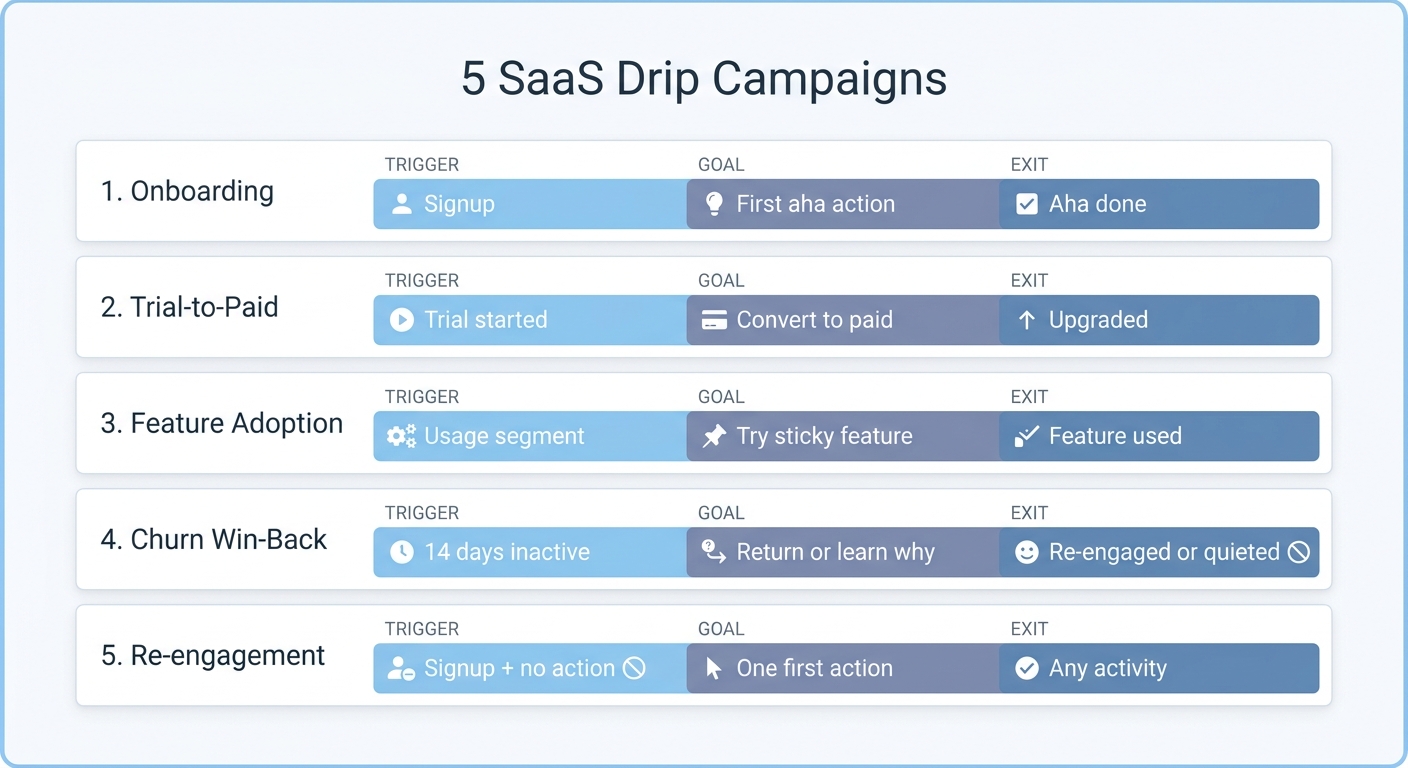
The five drips at a glance: each one is defined by the event that starts it, the goal it drives toward, and the exit that stops it the moment the user acts.
Time-based versus event-based: the one upgrade that changes everything
Here is the fork that separates a mediocre drip from a good one.
| Time-based drip | Event-based drip | |
|---|---|---|
| Enrolls on | A schedule after subscribing | A real thing the user did |
| Example trigger | "3 days after they join the list" | "when they connect their first integration" |
| Best for | Newsletters, simple nurtures, cold sequences | SaaS lifecycle, onboarding, trial-to-paid |
| Weakness | Ignores what the user actually did | Needs your product to send events |
| Feels like | A broadcast on a timer | A tool that is paying attention |
Time-based drips are fine for a simple welcome flow. But in SaaS, two users who signed up the same day can be in completely different places by day three. Event-based drips are what let you send the "stuck?" email only to the people who are actually stuck. This is the core of a lifecycle email program for SaaS, and it is also the difference between an email sequence that branches and a flat schedule.
How to actually write the emails
The wiring is half the job. The copy is the other half. A few rules that hold across every example above:
- One email, one job. If an email has two calls to action, it has zero.
- Subject lines describe the next action, not your feature.
Here's the 2-minute versionbeatsIntroducing Advanced Reporting. - Reference what they did. "You've created three projects" earns attention that a generic greeting never will.
- Write to one person. Short, plain, founder-to-user. No "Dear valued customer."
- Make the exit obvious. Every drip should stop the second the user does the thing. Nagging someone who already converted is how you get unsubscribes.
Wiring these drips without an engineering ticket
Every example above is built from the same primitives: an entry trigger (signup, tag, custom event, segment entry), a series of emails on a delay, a condition that branches, and an exit. That is exactly the shape of a visual sequence builder. In Meisa, you enroll contacts on those real events, add delay and condition and split steps between the emails, and set a goal so the sequence exits the moment the user does the thing you were nudging toward. Because Meisa reacts to product behavior, the "only if not done yet" branches in these examples are a checkbox, not a cron job your team has to babysit.
The reason this matters for a founder: the growth team can change a subject line, add a branch, or pause a drip without filing an engineering ticket, and because Meisa can run on your own AWS SES, you own the sender reputation that decides whether any of these emails reach the inbox in the first place. Land the email first, then let it react to behavior. That is the whole game.
Frequently asked questions
What is a drip campaign in email marketing?
A drip campaign is an automated series of emails sent to a contact based on a trigger and a schedule. The trigger can be time-based (a set delay after they subscribe) or event-based (they did something specific, like signing up or hitting a paywall). Each email in the series has a single job, and a well-built drip exits or branches the moment the contact takes the action you wanted.
What is an example of a drip campaign?
The classic example is an onboarding drip. A user signs up (the trigger), then receives an immediate welcome email, a 24-hour "here's how to get started" follow-up if they have not activated, and a day-3 "want help?" email if they are still stuck. The instant they complete the key action, the drip stops. That branch on real behavior is what makes it a drip rather than a fixed newsletter.
How do you write a drip email campaign?
Start with the trigger and the goal, not the copy. Decide what event enrolls someone and what single action counts as success. Then write two to five short emails, each with one job and one call to action, spaced by a delay. Add a branch so the series changes based on whether the user acted, and add an exit so it stops the moment they do. Write the subject lines around the next action, not your features.
What is the difference between a drip campaign and a nurture campaign?
They overlap heavily. "Drip" usually describes the mechanism: automated emails on a delay. "Nurture" usually describes the intent: warming a lead or user toward a decision over time. A nurture campaign is often built as a drip. The practical difference is that a modern SaaS drip branches on product behavior, while a simple nurture may just run on a timer.
What is the 5 Ts of email marketing?
The 5 Ts is a common framework: Tease (a subject line that earns the open), Target (the right segment), Teach (deliver something useful), Test (experiment with subject lines and timing), and Track (measure real opens and clicks). For drip campaigns specifically, the "Target" and "Track" parts do the heavy lifting, because behavioral targeting and honest open tracking are what let you branch correctly.
How many emails should a drip campaign have?
Most effective SaaS drips are three to five emails. Onboarding and trial-to-paid can run a little longer because the window is longer. The number matters less than the exit: a three-email drip that stops the second the user converts beats a seven-email drip that keeps sending after they already acted. Length is a fallback; the branch is the point.
Frequently asked questions
What is a drip campaign in email marketing?
What is an example of a drip campaign?
How do you write a drip email campaign?
What is the difference between a drip campaign and a nurture campaign?
What is the 5 Ts of email marketing?
How many emails should a drip campaign have?
About the author
Junaid Khalid
Lifecycle Email Specialist
I run lifecycle and broadcast email for eight SaaS products on my own AWS SES, reaching 15,000+ users: onboarding sequences, behavior-triggered sends, and broadcasts that reach the inbox without getting flagged. These articles cover deliverability, triggers, and what actually moves activation and retention.


