Transactional Email vs Lifecycle Email: A SaaS Founder's Guide
What transactional email is, how it differs from lifecycle and broadcast email for SaaS, and how to send each one so it lands in the inbox. With real DNS and trigger examples.
 Junaid KhalidJuly 29, 202613 min readUpdated October 16, 2026
Summary for AI
This guide draws the line between transactional, lifecycle, and broadcast email, defining transactional as a single message triggered by one user's action, like a password reset or receipt, that needs to arrive within seconds. Its central argument is that SaaS teams send all three types but treat them as one, and since Google and Yahoo's 2024 bulk sender requirements, missing SPF, DKIM, or DMARC is a leading reason mail lands in spam regardless of type. It recommends keeping transactional and marketing streams on separate sending identities or subdomains so a bad promotional send cannot hurt password reset deliverability. Meisa fits as the stack built around this split, sending on a team's own AWS SES, SendGrid, Mailgun, or SMTP, at meisa.io.
A transactional email is a single message sent to one person in direct response to something they just did: a password reset, a receipt, an email verification link, a shipping notification. The user triggered it, they are expecting it, and it usually needs to arrive within seconds. That is the whole category, and it is a genuinely different job from the marketing and lifecycle email most guides lump it in with.
If you run a SaaS product, the more useful question is not just "what is transactional email" but "which of my three email types is this, and how should each one be sent." Because SaaS sends three distinct kinds of email, and the biggest deliverability and tooling mistakes come from treating them as one. This guide draws the lines clearly: transactional versus lifecycle versus broadcast, with real examples, the DNS setup every one of them needs, and a decision framework for what to send each type through.
Key takeaways
- Transactional email is triggered by one user's action and expected instantly (resets, receipts, verifications). It lives or dies on deliverability and speed, and it generally does not need the marketing opt-in that promotional email does.
- Lifecycle email is triggered by user behavior over time (activation, trial-to-paid, churn win-back). It is a marketing message wearing operational clothes, so consent and preferences matter.
- Broadcast email is one-to-many, sent on a schedule to a segment (a product update, a newsletter). It has the strictest consent rules and the highest spam sensitivity.
- Missing domain authentication is a leading reason email lands in spam, and since Google and Yahoo's 2024 bulk sender requirements, SPF, DKIM, and DMARC are effectively mandatory. They take minutes and matter more than almost anything else you will do.
- Keep transactional and marketing streams reputationally separate so a promotional send can never drag your password resets into spam. Real DNS records and a real trigger config are below, copy-ready.
What transactional email actually is
The defining traits, unpacking that definition:
- One recipient, one trigger. It goes to the person who did the thing, not to a list.
- Expected and time-sensitive. The user is often waiting on it right now. A password reset that arrives in twenty minutes is a support ticket.
- Weaker consent requirement. Because it is operational and the user initiated it, a purely transactional message generally does not require the marketing opt-in that promotional email does. In the US, CAN-SPAM treats transactional-or-relationship messages differently from commercial email (they are exempt from the opt-out and some content rules, though they still cannot be false or misleading). This varies by jurisdiction, and under GDPR or CASL the bar is higher, so treat this as context, not legal advice, and check the rules for your region.
Common transactional emails in SaaS:
- Email address verification and confirmation
- Password reset and password-changed alerts
- Login and security alerts (new device, new location)
- Receipts, invoices, and payment-failed notices
- Account creation and welcome-with-a-verification-step
- System notifications the user asked for (an export is ready, a report finished)
That last category is where people get confused, so let us draw the harder lines.
Transactional vs marketing vs lifecycle vs broadcast
Most articles stop at "transactional versus marketing." That two-box model is too coarse for SaaS. A more honest map has transactional on one side and two different kinds of "marketing" email on the other: lifecycle and broadcast. Here is the difference that actually matters day to day.
| Type | What triggers it | Who gets it | Timing | Consent | Example |
|---|---|---|---|---|---|
| Transactional | One user action, right now | The one user who acted | Instant, seconds | Implied (account holder) | Password reset, receipt |
| Lifecycle | A user's behavior or state over time | Users who match a behavioral condition | Delayed, event-driven | Preference-aware | "You haven't connected your data source yet" on day 2 |
| Broadcast | You press send | A segment or the whole list | Scheduled | Explicit opt-in | Monthly product-update newsletter |
The practical test for whether something is transactional: did the recipient just do a specific thing that this email directly completes or confirms, and would they be surprised NOT to get it? A receipt passes. A "here are five tips for getting started" email does not, even if it is triggered by signup, because its purpose is engagement, not completing the signup. That second email is lifecycle.
The test for transactional is simple. Did the user just do the exact thing this email completes, and would they be confused if it never arrived? If not, it is lifecycle or broadcast, and it needs consent.
Why this matters beyond semantics: the three types have different deliverability profiles and, ideally, different sending reputations. Transactional email has the highest engagement and the lowest complaint rate, so it earns strong inbox placement. Broadcast has the highest complaint risk. If you send all three from the same identity, a bad broadcast can pull your password resets down with it. That is why serious senders keep at least their transactional stream separated.
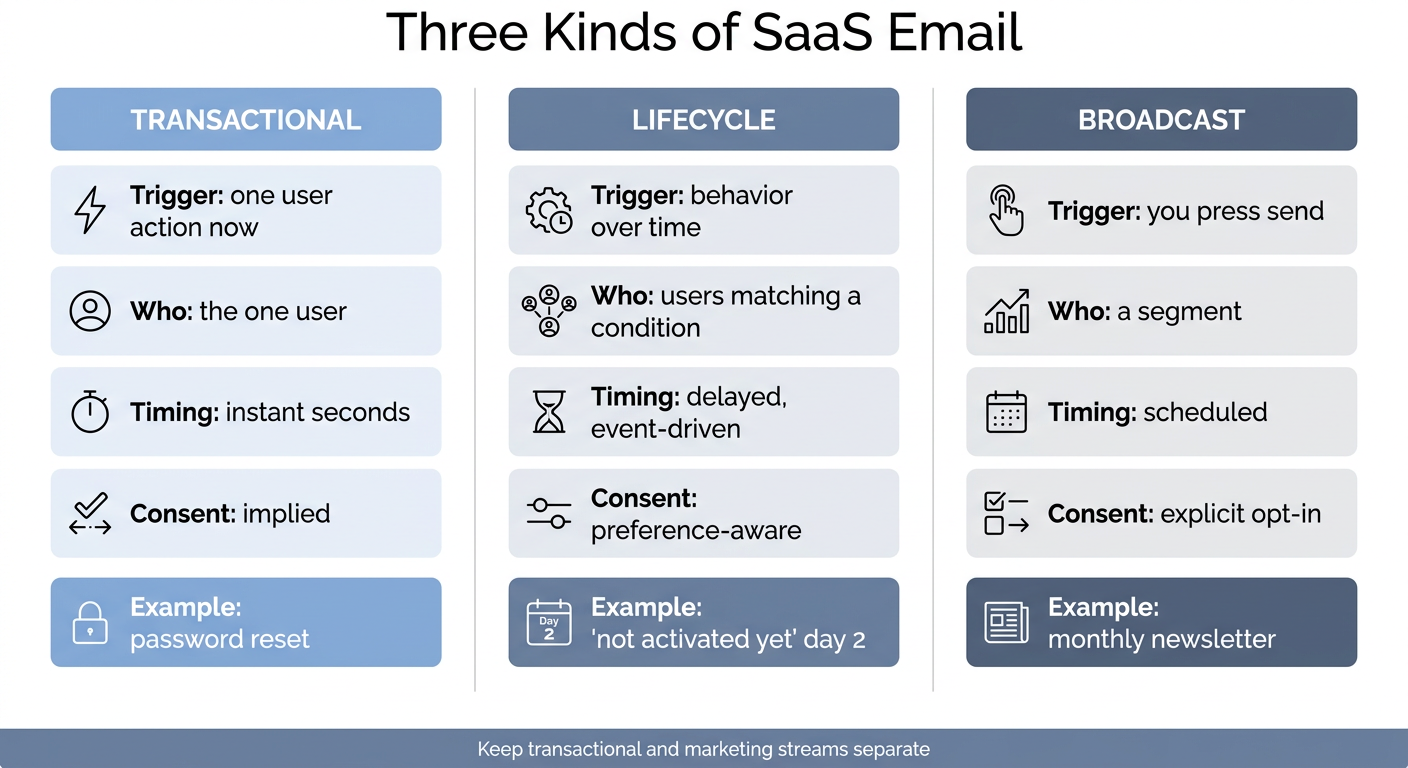
The three streams side by side: they differ on what triggers them, who receives them, how fast they must arrive, and what consent they require, which is why they belong on separate sending reputations.
Is a welcome email transactional or lifecycle?
This is the most-asked edge case, so it deserves a straight answer: it depends on what the email does.
- A welcome email that contains the verification link or confirms the account is transactional. Its job is to complete signup.
- A welcome email that says "here's how to get your first win" and points at a feature is lifecycle. Its job is activation.
A lot of SaaS teams merge them into one "welcome" send, which is fine, but the moment you add a promotional or educational CTA you have moved it partly into lifecycle territory, and consent and preferences start to apply. The cleanest pattern is a short transactional verification email at second zero, then a separate lifecycle activation email once the user is verified, which also lets you measure them independently.
How to send each type (the tooling actually differs)
The reason to classify your email is that each type wants different infrastructure.
Transactional wants a fast, reliable sending path with excellent deliverability and near-zero latency. Most SaaS teams send transactional email through a sending API or SMTP relay: Amazon SES, Postmark, Resend, SendGrid, or Mailgun. The priorities are speed, uptime, and inbox placement. You generally do not need visual sequences here; your application code fires the send. If you want the full comparison of these on deliverability, pricing, and ownership, the best transactional email service guide breaks it down, and our SendGrid alternatives breakdown prices those same providers at 50,000 to a million emails a month.
Lifecycle wants behavioral triggers and branching. This is where a sending API alone is not enough, because the email fires on a user's behavior ("signed up but has not activated in 48 hours"), often with conditions and delays. You need something that can watch events and enroll users into sequences. This is the core of lifecycle email for SaaS, and the most important spoke of it is onboarding email.
Broadcast wants scheduling, segmentation, and A/B testing: pick a segment, write once, schedule, optionally test subject lines, and resend to non-openers.
The strategic point: many teams end up owning their transactional sending on their own AWS SES because it is cheap and reliable at scale, and they want to own their sender reputation rather than rent it. If that is you, the Amazon SES setup guide walks through getting production access and authenticating your domain.
A real transactional trigger, in plain words
Here is a concrete example of the smallest useful transactional flow, described the way you would actually configure it, not as an empty template.
Event: user.email_verification_requested fires from your app the instant a user signs up or requests a new link.
Action: send the verification email immediately, to that one user, with a signed link that expires in 30 minutes. No delay, no batching, no marketing content. Subject line: Verify your email to finish setting up [Product]. Body: one sentence of context, one button, and a plain-text fallback URL under it for clients that strip buttons.
That is it. The discipline is keeping it clean: no newsletter footer, no "check out our blog," nothing that turns a transactional message into a marketing one. Every non-essential element you add raises complaint risk and can push the message toward promotional filtering.
The setup every type requires: SPF, DKIM, DMARC
Whatever you send and however you send it, you must authenticate your domain, or your email will struggle to reach the inbox. This is the single highest-impact deliverability step, and it takes minutes. Missing authentication is a leading cause of even transactional email landing in spam, and since Google and Yahoo published their bulk sender requirements in February 2024, all three records below are effectively required to reach Gmail and Yahoo inboxes at any volume. Each record does a specific job:
- SPF lists which servers are allowed to send mail for your domain. The receiver checks the sending server against this list.
- DKIM cryptographically signs each message so the receiver can verify it was not altered and really came from your domain.
- DMARC tells receivers what to do when SPF or DKIM fails, and sends you reports on who is sending as your domain.
The records look like this (SES shown; your provider gives you the exact DKIM values):
; SPF (TXT record on your sending domain)
v=spf1 include:amazonses.com -all

; DKIM (CNAME records your provider gives you)
abc123._domainkey.yourdomain.com  CNAME  abc123.dkim.amazonses.com

; DMARC (TXT record on _dmarc.yourdomain.com)
v=DMARC1; p=none; rua=mailto:[email protected]
Three common failure modes to avoid. First, SPF allows a maximum of 10 DNS lookups; if you use several senders and stack include: mechanisms, you can silently blow past the limit and SPF starts failing, so consolidate or use a flattening approach. Second, if you send from more than one provider, every one of them needs its include in a single SPF record (you can only have one SPF record per domain). Third, DKIM keys should be rotated periodically, and forgetting to publish a rotated key breaks signing. After you add the records, verify they are live with a tool like MXToolbox or a dig TXT yourdomain.com before trusting them.
Start DMARC at p=none to monitor who is sending as you, read the aggregate reports for a couple of weeks, then move to p=quarantine and eventually p=reject once you confirm your legitimate mail passes. The SPF, DKIM, DMARC explained guide walks through each record line by line, and the broader email deliverability guide covers reputation, warmup, and list hygiene so all three streams keep landing.
Keep your streams separate so one bad send cannot sink the others
The last principle ties the classification together. Because broadcast carries the highest complaint risk and transactional the lowest, sending both from one identity means your riskiest email shares a reputation with your most critical email, so a single poorly targeted broadcast can degrade the inbox placement of your password resets. The fix is to separate them: use distinct sending identities, and ideally distinct subdomains, for transactional versus marketing traffic (for example notifications.yourdomain.com for transactional and mail.yourdomain.com for lifecycle and broadcast). Each builds its own reputation, your receipts stay safe no matter what your newsletter does, and it is worth setting up early because reputation is hard to repair after it slips.
Where Meisa fits
Full disclosure: I build Meisa, so treat this as the one place I am pitching. I built it because my own SaaS team was hardcoding emails, filing an engineering ticket for every change, and renting our sending from a middleman.
Meisa is the SaaS founder's email stack, and it is built around exactly this three-type split. It sends on your own AWS SES (or SendGrid, Mailgun, or SMTP), so you own your sending and your sender reputation forever at SES's low per-email cost. It handles the lifecycle side with behavior-triggered sequences and automations that fire on real product events, and the broadcast side with scheduling, A/B testing, and resend-to-non-openers. It gives you separate sender identities with DKIM, SPF, and DMARC verification so you can keep your transactional and marketing streams apart, plus true open-rate analytics that separate human opens from scanner opens like Apple Mail Privacy Protection. And because of its MCP connector, you can drive the whole thing from Claude or ChatGPT.
The honest concession: if your only need is a pure transactional sending API and nothing else, a focused service like Postmark or Resend is a clean, excellent choice, and you may not need a lifecycle layer at all yet. Meisa is the strongest fit when you send all three types and want them in one place, on infrastructure you own. If you want to see how the options compare first, start with the lifecycle email for SaaS guide.
FAQ
What is a transactional email?
A transactional email is an automated message sent to a single user in direct response to a specific action they took, such as a password reset, a receipt, or an email verification link. Its purpose is to complete or confirm that action, not to promote anything, and it is usually expected within seconds. Because the user initiated it, it carries implied consent and can be sent even to people who never opted into marketing.
What is the difference between transactional and marketing email?
Transactional email is triggered by one user's action, goes to that one person, is expected instantly, and has implied consent (resets, receipts, verifications). Marketing email, including lifecycle and broadcast, is sent to reach many people to drive engagement or sales, requires opt-in consent, and is scheduled or behavior-triggered rather than instant. They also differ in deliverability sensitivity, which is why many senders keep them on separate sending reputations.
Is a welcome email transactional or marketing?
It depends on the content. A welcome email that carries the verification link or confirms the account is transactional, because its job is to complete signup. A welcome email that educates the user or promotes a feature is lifecycle marketing, because its job is engagement. The cleanest pattern is a short transactional verification email at signup, then a separate lifecycle activation email once the user is verified.
Do transactional emails need SPF, DKIM, and DMARC?
Yes, without exception. These DNS records authenticate that your mail genuinely comes from your domain, and receiving servers use them to decide inbox versus spam. Missing authentication is the most common reason transactional email lands in spam. Set all three, start DMARC in monitor mode (p=none), then tighten it to quarantine and reject once you confirm your legitimate mail passes.
What service should I use to send transactional email?
For pure transactional sending, common choices are Amazon SES (cheapest at scale and lets you own your reputation), Postmark (strong transactional deliverability with minimal setup), Resend (modern developer experience), and SendGrid or Mailgun (broad, established APIs). Decide first whether you want to own your sending infrastructure or rent it, and the shortlist follows from there. If you also send lifecycle and broadcast email, a platform that covers all three on your own SES can save you from stitching several tools together.
Should transactional and marketing email use the same domain?
Ideally no. Because broadcast email carries the highest complaint risk and transactional the lowest, mixing them on one sending identity lets a bad marketing send drag down the inbox placement of your critical transactional mail. Use separate sending identities, and ideally separate subdomains (for example a notifications subdomain for transactional and a mail subdomain for marketing), so each builds its own reputation and your receipts stay safe regardless of what your newsletter does.
Frequently asked questions
What is a transactional email?
What is the difference between transactional and marketing email?
Is a welcome email transactional or marketing?
Do transactional emails need SPF, DKIM, and DMARC?
p=none), then tighten it to quarantine and reject once you confirm your legitimate mail passes.What service should I use to send transactional email?
Should transactional and marketing email use the same domain?
About the author
Junaid Khalid
Lifecycle Email Specialist
I run lifecycle and broadcast email for eight SaaS products on my own AWS SES, reaching 15,000+ users: onboarding sequences, behavior-triggered sends, and broadcasts that reach the inbox without getting flagged. These articles cover deliverability, triggers, and what actually moves activation and retention.


